
My week
My week shows your time on every board in one table: a card per row, a day per column.
Open it from the menu under your initials, or from Open my week in the log box.
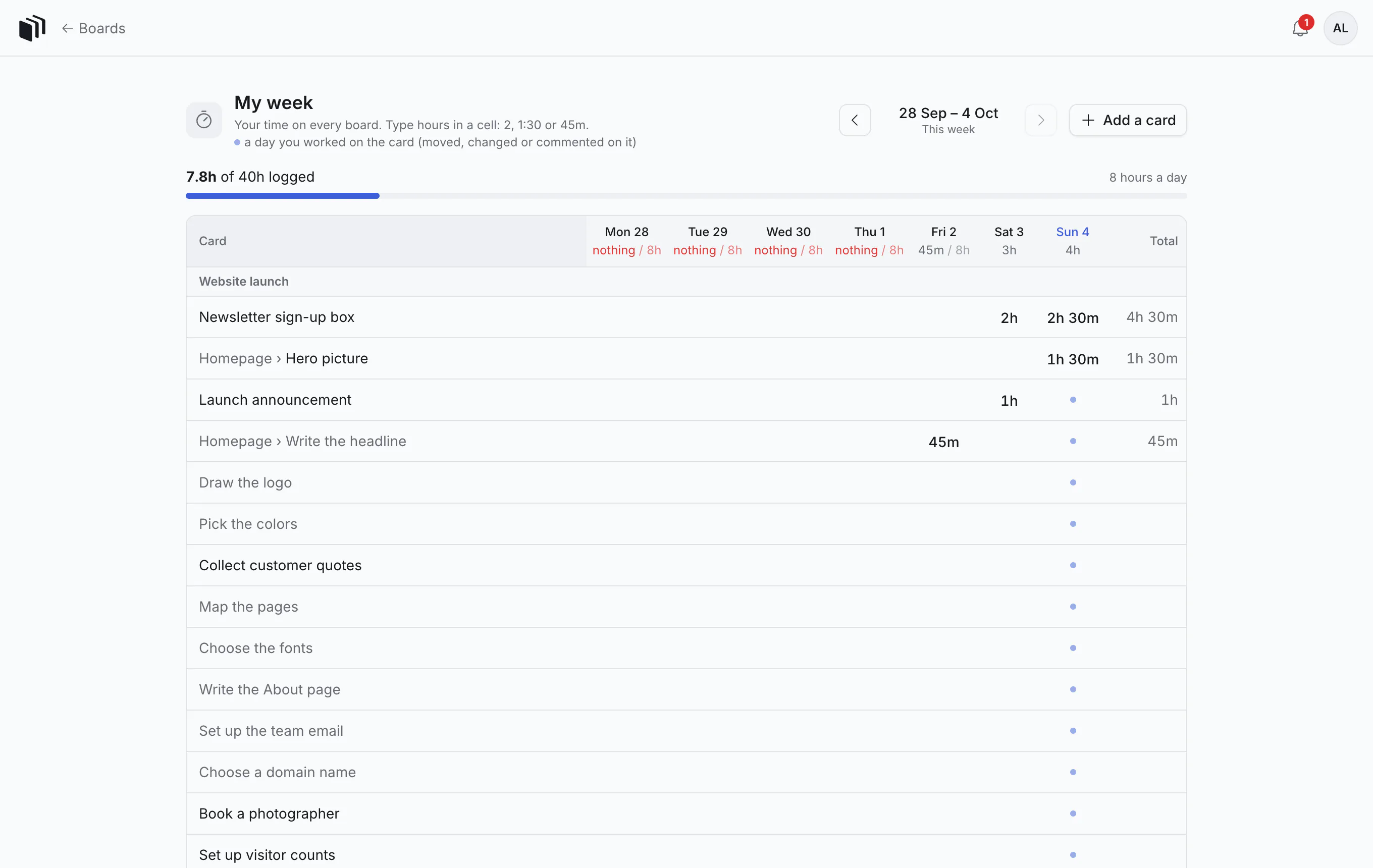
Read it
- The top says how much of the week is logged, against your hours a day (8 unless your team's plan says otherwise).
- Each day's heading shows that day's total. A working day with nothing logged stands out.
- Cards are grouped by board.
- A dot in a cell marks a day you worked on that card (moved it, changed it or commented on it) without logging time. It is a nudge: did that take time?
Fill it in like a spreadsheet
Click a cell and type hours: 2, 1:30 or 45m. Move between cells with the arrow keys or Enter.
To log on a card that is not listed, click Add a card and pick it.
Other weeks
Use the arrows beside the dates to move a week back or forward. This week brings you back.
Good to know
- My week is yours alone. Nobody else sees this page.
- Time you log here is the same time shown on the cards: there is only one record.
- Your assistant can read it: "Which days this week have I not logged?"