
Your account
Click your initials at the top right for your account menu.
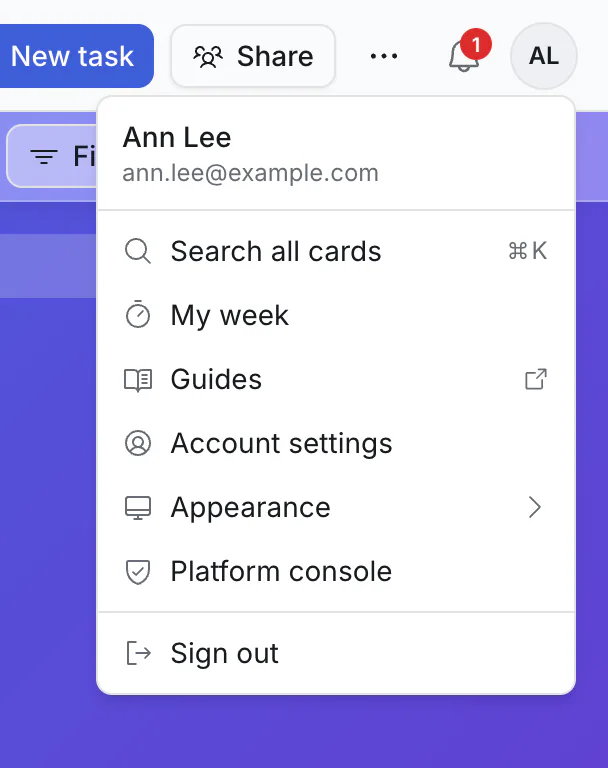
From here: Search all cards, My week, Guides (these pages), Account settings, the appearance (light, dark, or following your device), and signing out. People who run the site also see Platform console, where the site itself is set up.
Account settings
| Section | What is there |
|---|---|
| Profile | Your name as others see it, and the email address you sign in with. |
| Password | Change your password. |
| Notifications | The morning summary, reminder emails, desktop notifications, and your time zone. See notifications. |
| Calendar | Google Calendar and the calendar link. See calendar. |
| Email sending | Use your own email service for the invites you send. Optional. |
| File storage | Keep the files you attach in your own storage. Optional. |
| API & apps | Connect an AI assistant or another app. See connect your assistant. |
Most people only ever need the first four.
Your name and time zone
Your name shows on cards you are assigned, on your comments, and when someone @mentions you.
Your time zone decides when your morning summary arrives. Dates with a time are always shown in your own time.
Dark theme
Switch between light, dark, or your device's own setting from the account menu. It is remembered on that device.
Use it like an app
On a phone, tablet or computer, your browser can install Kanbanto ("Install" or "Add to Home Screen"). It then has its own icon and window. It still needs an internet connection.
If you forget your password
On the sign-in page, use Forgot password to get a reset link by email. If your site does not send email, ask whoever runs it: they can make a reset link for you.
Leaving
If you want your account removed, ask whoever runs your Kanbanto site. Boards you own should be handed to another owner or deleted first.
That is everything
You have reached the end of the guides. If something here does not match what you see, the app has probably moved on: tell whoever runs your site.