
Webhooks: tell another app when a board changes
A webhook is a message Kanbanto sends to an address of yours the moment something happens on a board: a card is moved, a comment is written, a reminder goes off. At the other end can be a chat channel, an automation tool (n8n, Make, Zapier and the like), or a small program of your own.
People use them to tell a team chat what is happening on a board, to add a row to a spreadsheet for every new card, or to start work in another system when a card reaches a list.
This page is for whoever sets that up. It has three parts:
- Send to a chat channel: Slack, Google Chat, Microsoft Teams or Discord. Nothing to write: the channel gets sentences.
- Add a webhook for another app or a program of your own, which gets the data.
- Receiving that data safely, with the signing secret and an example to copy.
Before you start
- You own the board. Webhooks are a board's own setting, for its owners.
- The site allows them. On a server of your own, a platform admin chooses in Platform console → Integrations → Webhooks: Off (how a new site starts), To public addresses only, or To any address. While they are off, Board settings says so.
- You have an address that can receive them: an
https://address on the internet with something listening. (A site set to "any address" also takeshttp://and addresses inside its own network.)
Send to a chat channel
A channel in Slack, Google Chat, Microsoft Teams or Discord can be told what happens on a board, in words:
Ann moved “Deploy” to Done on Launch
The card's title opens the card. A comment comes with how it starts ("Ann commented on “Deploy” on Launch: Shipped this morning."), and a reminder with who it is for.
- In the chat app, get the channel's address (below, for each app).
- In Kanbanto, open the board, then ⋯ → Board settings → People & apps.
- Under Webhooks, choose the chat app in Send to, paste the address and click Add.
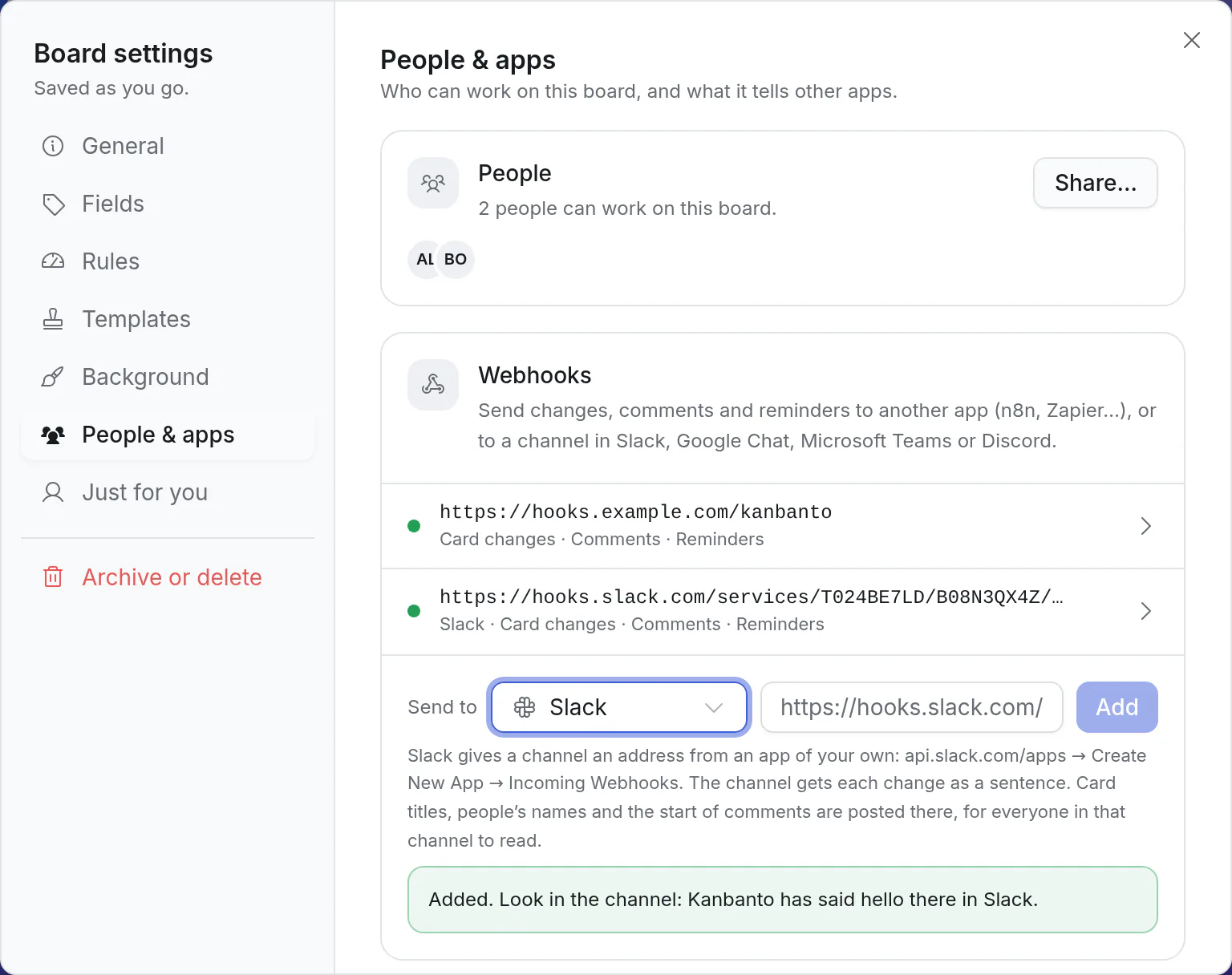
The channel gets a first message straight away: "Kanbanto will post news from Launch here." If it doesn't arrive, the webhook isn't saved, and Kanbanto says what the chat app answered: copy the address again.
Where each app gives out the address
| App | Where |
|---|---|
| Slack | Slack gives addresses out through an app of your own, which takes a few minutes once. Go to api.slack.com/apps, Create New App → From scratch, name it (say, "Kanbanto") and pick your workspace. Open Incoming Webhooks, switch it on, click Add New Webhook to Workspace, pick the channel and allow it. Copy the address that appears: it starts with https://hooks.slack.com/services/. For another channel later, add another webhook to the same app. |
| Google Chat | In the space, click its name at the top, then Apps & integrations → Webhooks → Add webhook. Name it and copy the address: it starts with https://chat.googleapis.com/. (Spaces in a work or school account; the admin may have to allow webhooks.) |
| Microsoft Teams | On the channel, click ⋯ → Workflows, and pick the one that posts to a channel when a webhook request is received (it has been called "Post to a channel when a webhook request is received" and "Send webhook alerts to a channel"). Follow its steps and copy the address at the end. Messages arrive from "Workflows". |
| Discord | Open the channel's settings (the cog beside its name), then Integrations → Webhooks → New Webhook, and Copy Webhook URL: it starts with https://discord.com/api/webhooks/. |
What the channel hears
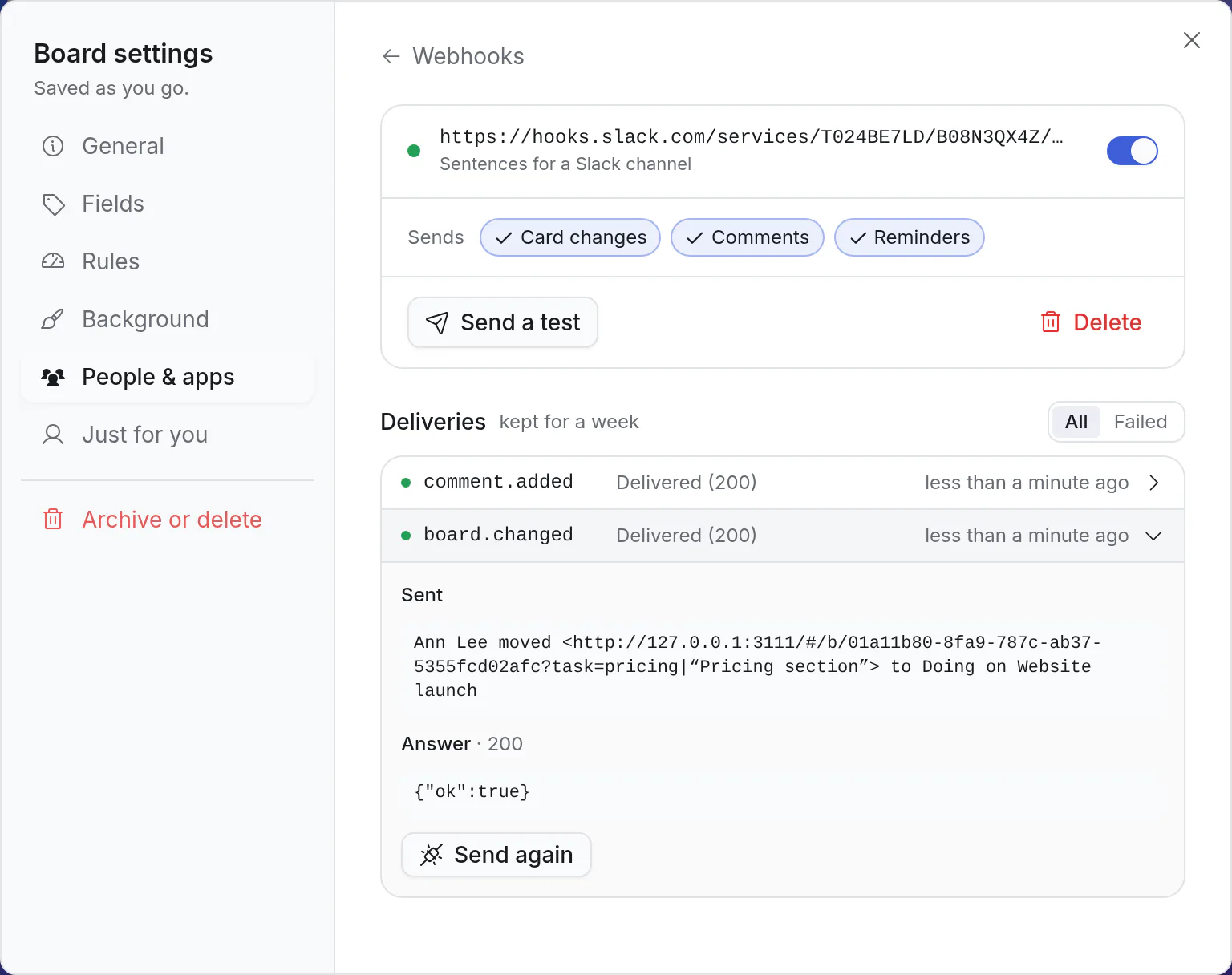
Click the webhook in the list to open it. The same three switches as for any webhook decide what is sent:
| Switch | The channel is told |
|---|---|
| Card changes | What the board's activity says: a card added, moved to another list, assigned, renamed, given a date, archived or deleted, and so on. Several things changed at once are one message. Putting cards in another order says nothing. |
| Comments | Who commented, on which card, and the first 200 characters. |
| Reminders | Who the reminder is for, the card, and when it is due. |
Send a test posts "A test from Kanbanto for Launch." Deliveries shows each message as it went, and Send again posts it again.
Everyone in the channel can read it
Card titles, people's names and the start of comments are posted in the channel and stay in its history, for everyone there, including people who aren't on the board. Pick the channel with that in mind.
Good to know:
- The address is the key to the channel. Whoever has it can post there. It is shown to the board's owners only.
- Nothing a card says can mention anyone. A card called "@everyone" arrives as those words and pings nobody.
- There is no signing secret for a chat webhook: nothing at the chat app would check it.
- Another chat app that takes Slack's messages (a Mattermost of your own, for one) works with "Slack" chosen, on a site whose admin allows webhooks to any address. Where only public addresses are allowed, the address has to be the chat app's own.
- To change the app, add another webhook and delete this one.
- Telegram has a box of its own in Board settings: a board gets a bot of its own, whose chat can also add cards. See Telegram: a bot for a board.
The rest of this page is about the other kind: a webhook that sends the board's data to an app or a program.
Add a webhook
- Open the board, then ⋯ → Board settings → People & apps. Webhooks are under the people.
- Leave Send to on Another app, paste the address and click Add.
- A box shows the signing secret. It starts with
whsec_. Copy it for the receiving end: it is how that end knows a message really came from Kanbanto (see The signing secret). You can look it up again later.
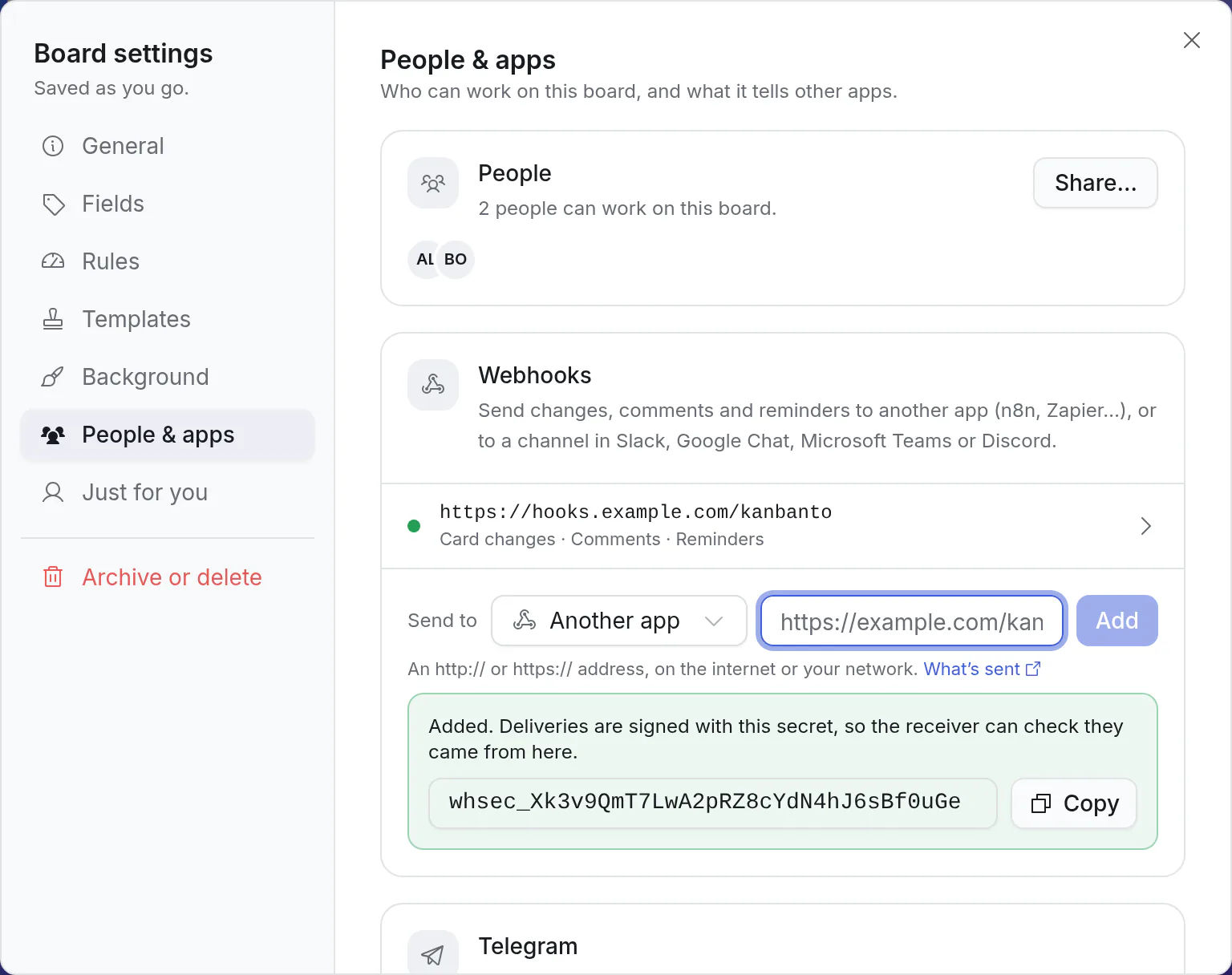
From now on, every change on the board is sent to that address.
The address is asked first
When you click Add, Kanbanto sends the address a one-time code, and the address has to send the code back. If it doesn't, you see "That address didn't confirm it wants these" and nothing is saved. This keeps anyone from pointing a webhook at a server that isn't theirs. The example below answers it. A site set to "any address" doesn't ask.
Choose what it sends, and try it
Click the webhook in the list to open it.
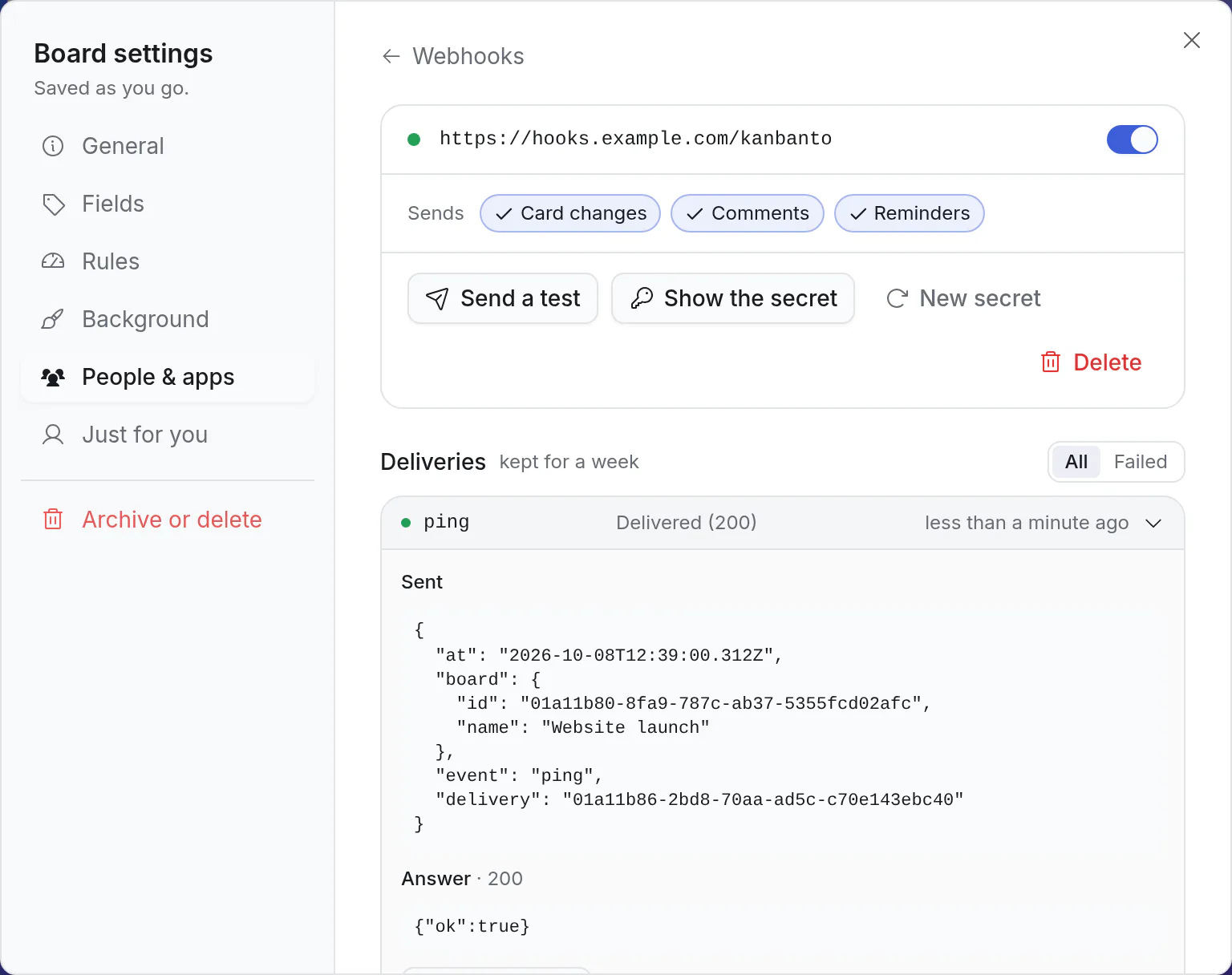
- Sends: switch Card changes, Comments and Reminders on or off. All three are on to start with.
- Send a test sends a small "ping" straight away and tells you what the address answered.
- The switch beside the address pauses the webhook, and starts it again.
- Show the secret shows the signing secret again. New secret replaces it: the old one stops working at once.
- Deliveries lists what was sent in the last week. Click one to see exactly what went out and what came back, and Send again if the other end missed it. Failed shows only the ones that didn't get through.
The dot beside the address is green when the last delivery worked, red when it failed, and grey while paused.
What is sent
Each message is a POST with a JSON body, and three headers:
| Header | What it holds |
|---|---|
X-Kanbanto-Event | The kind of message: board.changed, comment.added, reminder.due, or ping for a test |
X-Kanbanto-Delivery | This delivery's id. A retry of the same delivery has the same id |
X-Kanbanto-Signature | The proof that it came from Kanbanto: see The signing secret |
| In the app | Event | Sent when | What it holds |
|---|---|---|---|
| Card changes | board.changed | Anything on the board changes: a card is added, edited, moved, archived or deleted, or a list or label changes | board, actor (who did it), command (what they did), seq, and changes: each record before and after |
| Comments | comment.added | Someone comments on a card | board, actor, task (its id and title), and comment (its text, who it mentions, and the id, name and size of each file posted with it; for a comment about words of the description, those words as about, and for an answer to one the comment it answers as replyTo) |
| Reminders | reminder.due | A card's reminder goes off | board, task (id, title, due date, list), reminder, and for (who it is for) |
A description that people write for a while is saved every few seconds as they go. A webhook hears of it once, when the writing has paused: one board.changed, with the card as it was before and as it is after.
Every message also has event, delivery and at (when it happened).
A card moved to the Done list looks like this. It is shortened here: before and after are the whole card.
json
{
  "event": "board.changed",
  "delivery": "01a10d0f-48b8-7a79-8e32-48c27920b247",
  "at": "2026-10-06T08:00:00.000Z",
  "board": { "id": "01a10d0f-45b2-7065-b99a-7dfc03c68c7c", "name": "Launch" },
  "actor": { "id": "01a10d0f-4559-745a-b5e3-85f35b930a2d", "name": "Ann Lee" },
  "command": "task.update",
  "seq": 42,
  "changes": [
    {
      "entity": "task",
      "id": "A3",
      "before": { "id": "A3", "title": "Deploy", "status": "doing" },
      "after": { "id": "A3", "title": "Deploy", "status": "done", "doneAt": "2026-10-06T08:00:00.000Z" }
    }
  ]
}
A comment:
json
{
  "event": "comment.added",
  "delivery": "01a10d0f-48c9-7640-b9c4-40f8591b915a",
  "at": "2026-10-06T08:05:00.000Z",
  "board": { "id": "01a10d0f-45b2-7065-b99a-7dfc03c68c7c", "name": "Launch" },
  "actor": { "id": "01a10d0f-4559-745a-b5e3-85f35b930a2d", "name": "Ann Lee" },
  "task": { "id": "A3", "title": "Deploy" },
  "comment": { "id": "01a10d0f-48bb-72c5-9f10-4d8e70ed31e3", "body": "Shipped this morning.", "mentions": [], "files": [] }
}
Reading a card change:
statusis a list's id, not its name. A card that has just been finished gainsdoneAt, whatever its done list is called: that is the easy way to spot "done".- A new card has
"before": null. A deleted one has"after": null. seqgoes up by one with every change on the board. It tells you the order, and a gap tells you one is missing.- A change to more than 200 records at once is cut at 200, with
"truncated": true.
The signing secret
Anyone who learns your address could send it made-up messages. The signing secret is how the receiving end tells the real ones apart: only Kanbanto and you know it, and every message is signed with it. (Other tools call this a signing key or a webhook secret.)
Where it is. It is shown when you add the webhook, and again with Show the secret. Keep it like a password: put it in the receiver's settings, not in code you share. If it gets out, click New secret and give the receiver the new one.
How a message is signed. Each delivery comes with a header like this:
X-Kanbanto-Signature: t=1791273600,v1=271e381b6b8b9935ef2f05ce357ac5be64a86acd1bcb8215f8b929a4f43b23abtis when it was sent, in seconds.v1is the HMAC-SHA256, written in hex, oft, a dot, and the body exactly as it arrived, made with the secret.
How to check one. Do the same sum, and compare:
- Take
tandv1out of the header. - Join
t, a.and the raw body: the text that arrived, before anything turns it into an object. - Work out the HMAC-SHA256 of that with your secret, in hex.
- If it equals
v1, the message is from Kanbanto and nobody changed it. If not, answer401and do nothing else. - Also refuse a
tmore than five minutes old. That stops someone who caught an old message from sending it again.
In JavaScript (Node.js):
js
import { createHmac, timingSafeEqual } from 'node:crypto'

function fromKanbanto(rawBody, header, secret) {
  const [, t, v1] = /^t=(\d+),v1=([0-9a-f]{64})$/.exec(header ?? '') ?? []
  if (!t || Math.abs(Date.now() / 1000 - Number(t)) > 300) return false // missing, or more than 5 minutes old
  const expected = createHmac('sha256', secret).update(`${t}.${rawBody}`).digest()
  return timingSafeEqual(expected, Buffer.from(v1, 'hex'))
}
In Python:
python
import hashlib
import hmac
import time


def from_kanbanto(raw_body: bytes, header: str, secret: str) -> bool:
    try:
        t, v1 = (part.split("=", 1)[1] for part in header.split(","))
        age = abs(time.time() - int(t))
    except (AttributeError, IndexError, ValueError):
        return False
    if age > 300:  # more than 5 minutes old
        return False
    expected = hmac.new(secret.encode(), f"{t}.".encode() + raw_body, hashlib.sha256).hexdigest()
    return hmac.compare_digest(expected, v1)
Check your own code against this one
With these three, your code should arrive at the same v1. (It is an old message, so leave step 5 out while you try it.)
| Secret | whsec_EXAMPLE0000000000000000000000000 |
t | 1791273600 |
| Body | {"event":"ping","delivery":"01a0example","at":"2026-10-06T08:00:00.000Z","board":{"id":"b1","name":"Launch"}} |
v1 | 271e381b6b8b9935ef2f05ce357ac5be64a86acd1bcb8215f8b929a4f43b23ab |
The same sum in a terminal, on a Mac or Linux:
bash
printf '%s' '1791273600.{"event":"ping","delivery":"01a0example","at":"2026-10-06T08:00:00.000Z","board":{"id":"b1","name":"Launch"}}' \
  | openssl dgst -sha256 -hmac 'whsec_EXAMPLE0000000000000000000000000'
An example you can copy
This is a whole receiver in one file, with nothing to install but Node.js (version 18 or newer). It answers the check Kanbanto makes when you add the address, refuses anything that isn't signed with your secret, and says so when a card is finished, a comment is written or a reminder goes off.
Save it as receiver.mjs:
js
import { createHmac, timingSafeEqual } from 'node:crypto'
import { createServer } from 'node:http'

const SECRET = process.env.KANBANTO_SECRET
const seen = new Set() // deliveries already handled (a retry comes with the same id)

/** Did this really come from Kanbanto? `rawBody`: the request's body exactly as it arrived. */
function fromKanbanto(rawBody, header) {
  const [, t, v1] = /^t=(\d+),v1=([0-9a-f]{64})$/.exec(header ?? '') ?? []
  if (!t || Math.abs(Date.now() / 1000 - Number(t)) > 300) return false // missing, or more than 5 minutes old
  const expected = createHmac('sha256', SECRET).update(`${t}.${rawBody}`).digest()
  return timingSafeEqual(expected, Buffer.from(v1, 'hex'))
}

createServer(async (req, res) => {
  const chunks = []
  for await (const chunk of req) chunks.push(chunk)
  const rawBody = Buffer.concat(chunks).toString('utf8')
  const answer = (status, body) => res.writeHead(status, { 'content-type': 'application/json' }).end(JSON.stringify(body))

  // 1. The check Kanbanto makes when the webhook is added: send its code back. (Not signed: there's no secret yet.)
  if (req.headers['x-kanbanto-event'] === 'verify') {
    try {
      return answer(200, { challenge: JSON.parse(rawBody).challenge })
    } catch {
      return answer(400, { error: 'not JSON' })
    }
  }

  // 2. Everything else has to be signed with the secret.
  if (!fromKanbanto(rawBody, req.headers['x-kanbanto-signature'])) return answer(401, { error: 'bad signature' })

  // 3. Answer at once, then do the work. Something already handled is skipped.
  answer(200, { ok: true })
  const id = req.headers['x-kanbanto-delivery']
  if (seen.has(id)) return
  seen.add(id)
  handle(JSON.parse(rawBody))
}).listen(4010, () => console.log('Waiting for Kanbanto on port 4010'))

function handle(e) {
  if (e.event === 'board.changed')
    for (const change of e.changes)
      if (change.entity === 'task' && change.after?.doneAt && !change.before?.doneAt)
        say(`${e.actor?.name ?? 'Someone'} finished “${change.after.title}” on ${e.board.name}`)
  if (e.event === 'comment.added') say(`${e.actor.name} commented on “${e.task.title}”: ${e.comment.body}`)
  if (e.event === 'reminder.due') say(`Reminder for ${e.for.name}: “${e.task.title}”`)
}

function say(text) {
  console.log(text)
}
Start it with the secret from the app:
bash
KANBANTO_SECRET=whsec_… node receiver.mjsNow finish a card on the board and comment on it. The receiver prints:
Ann Lee finished “Deploy” on Launch
Ann Lee commented on “Deploy”: Shipped this morning.
Three things about it:
- It needs an address Kanbanto can reach: run it on a server of yours, behind
https://. To try it from your own computer, a tunnelling tool can give it a public address for a while. - To tell a chat channel, no program is needed: see Send to a chat channel. Write one only when the channel should hear something else than Kanbanto's own sentences.
- It forgets what it has handled when it restarts. For something that must never happen twice, keep the delivery ids somewhere that lasts.
Just want to see what arrives?
A request inbox such as webhook.site gives you an address and shows everything sent to it, with nothing to write. As it comes, it answers every request with the same words, so adding its address fails with "That address didn't confirm it wants these". Tell it to answer with what it was sent:
- On webhook.site, click Edit, at the top right.
- Make the response's content
$request.content$, and save. - In Kanbanto, add the address again.
Each message then shows up there with its headers, the signature among them. An inbox like this is for looking: it doesn't check signatures, and on its free plan anyone who knows the address can read what was sent to it. Point a board with real work at it only for a short while, then delete the webhook.
With an automation tool instead
Tools like n8n, Make and Zapier can receive a webhook without any code: make a "webhook" trigger there and paste its address into Kanbanto. Two things to look at:
- The first check. The tool has to answer with the code it was sent (see "The address is asked first"). One that lets you choose the reply can: reply with the body it received. One that always answers the same thing can't, unless your site is set to "any address".
- The signature. Many have a step that works out an HMAC: use the recipe under "How to check one". Without it, anyone who learns the address could send made-up messages, so keep that address to yourself.
When a delivery doesn't get through
- Answer with any 2xx status within 10 seconds. Do slow work after answering, as the example does.
- Anything else is tried again after 1 minute, 5 minutes, 30 minutes, 2 hours and 6 hours, then given up on. A retry carries the same
X-Kanbanto-Delivery, so the receiver can skip what it already handled. - Deliveries says why, for each one. Fix the other end, then Send again.
- Redirects aren't followed. Give the final address.
| You see | It usually means |
|---|---|
| "That address didn't answer" when adding | Nothing is listening there, or it can't be reached from the internet |
| "That address didn't confirm it wants these" | It answered, but without the code it was sent. A request inbox does this until it's told otherwise: see "Just want to see what arrives?" |
| "No answer within 10 seconds" | The receiver does its work before answering: answer first |
| "The address answered 401" | The receiver refused the signature: it has an old secret, or it checked a body it had already changed |
| "this site only sends webhooks to public addresses" | The address is inside a private network, and the site doesn't allow that |
If the receiver says a signature is wrong, the cause is nearly always one of three: it summed a body it had already turned into an object and back, instead of the raw text; the secret was replaced with New secret; or its clock is more than five minutes off.
Good to know
- A board can have up to 10 webhooks.
- A message carries what is on the cards: titles, descriptions, comments. Send them only where that is fine.
- Deliveries are kept for a week.
- Webhooks tell; they don't ask. To read or change cards from another app, use an API token (Account settings → API & apps); your site lists everything it can do at
/api/docs. - A retried message arrives late. Where the order matters, go by
seq.