
Write together
Several people can write the same article at the same moment. Each sees the others' cursors, and their words as they are typed. The text is saved as the writing goes, so nobody waits for anybody to finish.
It works on every card's description, on any board, not only in a handbook.
Join in
- Open the card. If someone is writing, the description says so: "Ben Ortiz is writing this now: Edit to write with them."
- Click Edit, or click in the text. You are in the same text as they are.
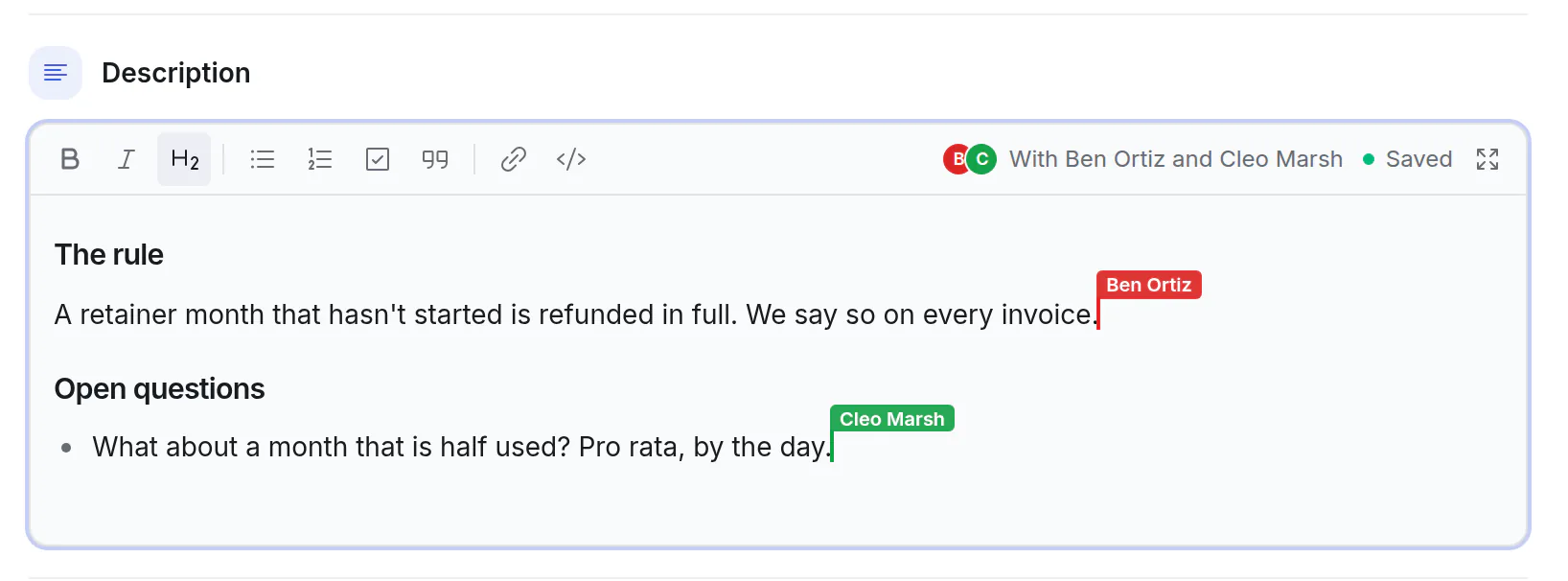
- Each person has a colour. Their cursor is a thin bar in that colour with their name over it. It moves as they type, and what they select is tinted the same.
- The right of the toolbar says who you are writing With.
- Expand while you write, and you carry on full page in the same text. Some can be in the card and some full page.
It saves as you write
- The text is saved a few seconds after you stop typing, and every so often while you keep going.
- The sign at the right of the toolbar says Saving…, then Saved.
- Esc, Done or clicking away finishes your writing. The others stay in the text.
- People who have the card open without editing see the text change each time it is saved.
What happens when
| When | What you get |
|---|---|
| Two people type in different places | Both are in the text, each where they typed. |
| Two people type in the same sentence | Both sets of words are there. Read the sentence through afterwards. |
| Two people start a new line at the very same spot | Their lines can come out mixed. Put your cursor in your own part first. |
| You press ⌘Z | Your own typing is taken back, not anyone else's. |
| Someone ticks a checklist item on the card while others write | The box waits. Tick it in the editor, or when they have finished. |
| An assistant or another app changes the description | It is told who is writing, and the text is left alone. It goes through once nobody has typed for two minutes. |
| The card is archived, deleted or moved to another board | Writing stops for everyone. Anything you typed in the last seconds is offered back on the card. |
A plan helps more than any of this: headings first, with a name under each, and everyone writes their own part. The Article template starts a card that way.
When your connection goes
The sign says Offline. Keep writing: what you type stays in your browser.
When you are back, your words are put together with what the others wrote meanwhile. There is nothing to do.
If you were away so long that the others had finished, your words can't be placed in the text for you. The card then says "What you wrote here … wasn't saved, and the text has changed since", with Copy what you wrote. Paste it where it belongs. The same can happen for a few seconds of typing when the site itself is updated while you write.
Versions
Every description keeps its earlier versions, however it was changed: by you, by someone else, or by an assistant.
- Open the description full page with Expand.
- Click Versions. The list is on the left, newest first, each with when it was saved and by whom.
- Click one to read the text as it was. Bring this version back makes it the text again.
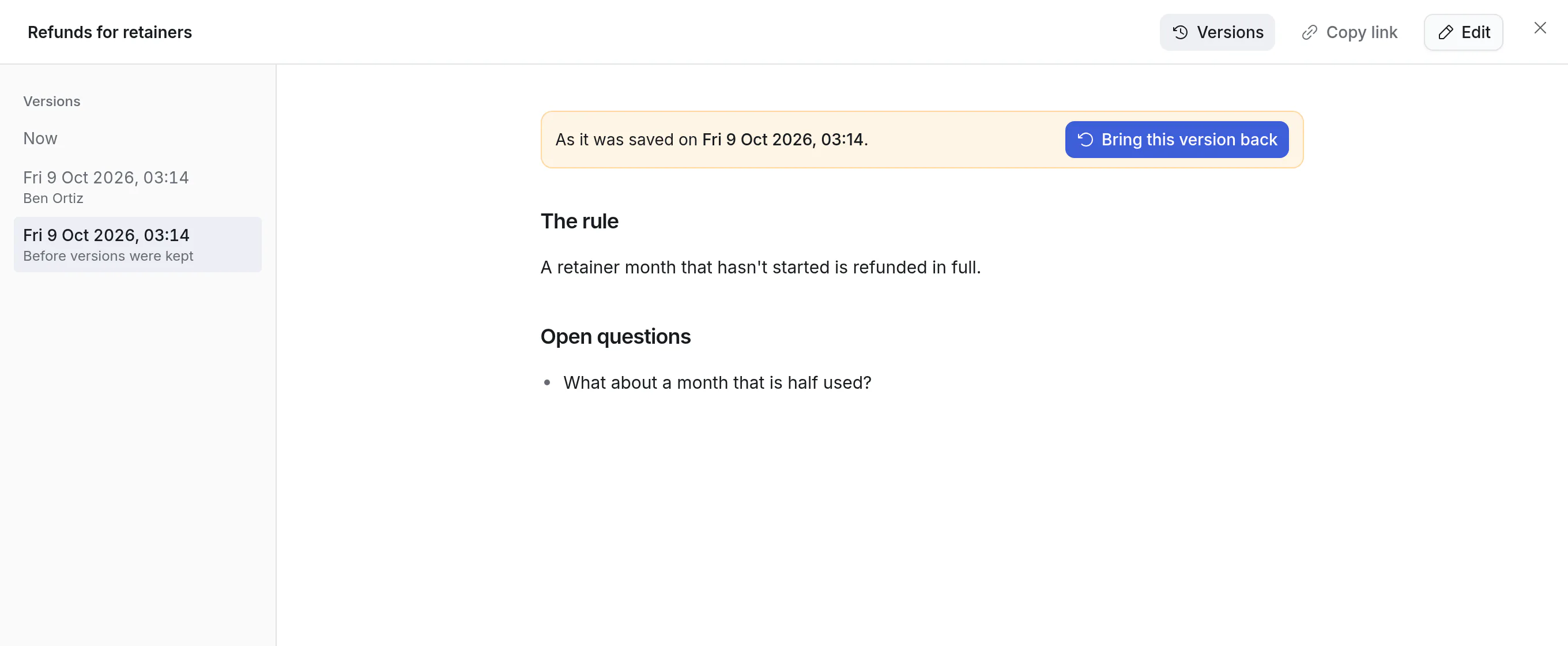
- A person's saves within ten minutes are one version: the last of them.
- A card keeps its newest 100 versions.
- Bringing a version back is a change like any other. The text it replaced is a version too, so you can go back the same way.
- A version can't be brought back while someone is writing. Wait until they have finished.
What History and the bell say
- The card's History has one line, "edited the description", for each person who wrote, about every ten minutes of writing. Not one for every save.
- People who follow the card are told once that the description was edited, not again and again.
- Someone you @mention in the text is told when it is saved, a few seconds later.
Good to know
- Everyone who can edit the board can write together. Viewers and visitors with the public link read, and see who is writing.
- It works on a phone.
- Comments are not written together: a comment is one person's.
- A description holds 50,000 characters. Past that the sign says Too long to save: move part of it to a page inside the page (see pages inside pages).
- If you open a description while you have no connection, you write it by yourself and it is saved when you finish, as long as nobody else is writing it by then.